Pest Control Google Ads Guide: Get More Booked Jobs
Build campaigns around the services, neighborhoods, and customers that make your pest control business money.
Build campaigns around the services, neighborhoods, and customers that make your pest control business money.
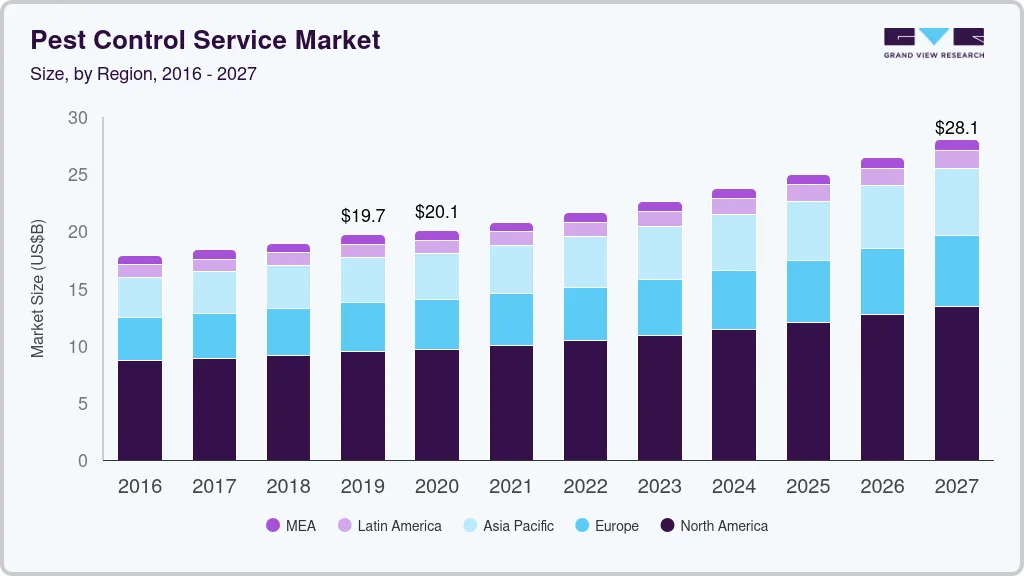
By 2030, the pest control industry will be worth $30.5 billion. That means that there is more business to capture, but also increased competition.
To stay ahead of competitors and capture growth, pest control companies need to invest into profitable channels. Google Ads is one of the best.
This pest control Google Ads guide explains how to build campaigns around the treatments you want to sell, the neighborhoods you can serve profitably, and the leads that actually turn into work.
It covers budgets, keywords, landing pages, call tracking, and what to change when results disappoint.
Let’s get into it!
Before opening Google Ads, consider which jobs you could take more and which ones you would actually want.
A recurring general-pest customer, a one-time bed bug treatment, and a commercial inspection have different sales processes and delivery costs. They shouldn’t all inherit the same acquisition target just because they came from Google.
Write down your priority services, average collected revenue, direct treatment costs, service radius, and available technician hours. Include callbacks, travel, and follow-up visits in the cost estimate. A high invoice doesn’t automatically mean a high-margin job.
For recurring plans, use observed retention rather than assuming every customer stays for years. If you have little history, start with a conservative first-year estimate and revisit it as customers renew or cancel.
Our broader guide to contractor lead generation explains how paid search fits alongside referrals, organic search, and other forms of marketing.
For a small pest control company starting paid advertising, we would usually test a focused Search campaign first. Someone searching for a rodent exterminator is expressing a need you can answer directly with an ad and a service page.
Search Ads: useful when you want control over keywords, service-specific messaging, and landing pages. Compare results by booked and completed jobs, not just clicks. 100% start here.
Local Services Ads: worth evaluating alongside Search where your business and location are eligible. Google lists pest control as an eligible category and describes a pay-per-lead model. Eligibility and screening vary by market. A charged lead still needs to become a customer.
Be careful with old setup guides: Google’s current documentation refers to the Google Verified badge. Don’t copy outdated Google Guarantee claims into your website or ads.
Performance Max: consider it as a later, separately measured test once conversion tracking and lead-quality feedback are dependable. It is harder to judge additional demand if your account cannot distinguish an actual prospect from a low-value form submission.
You don’t need to launch every campaign type at once. Give the first test enough budget and attention to answer whether it can acquire profitable customers.
We suggest starting off with high-intent local search campaigns as they can generate the best quality leads.
Build the budget from local click costs and your own economics. A national monthly spending recommendation won’t tell you whether you can afford a termite lead in your city.
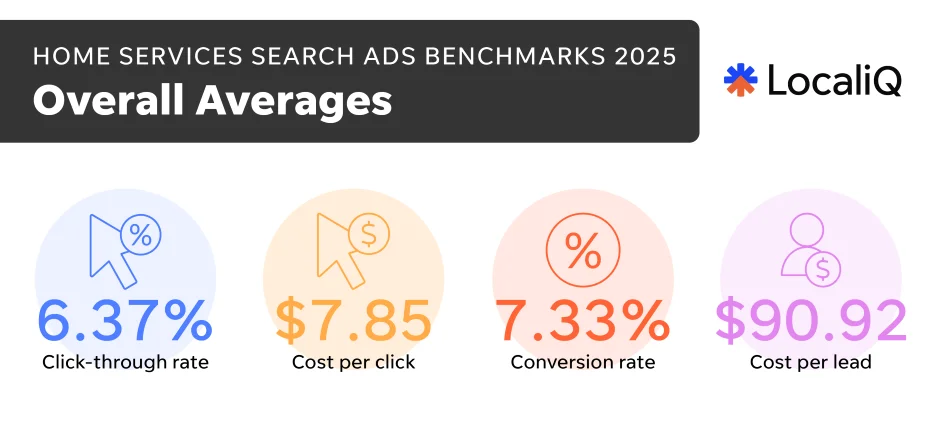
For context, LocaliQ’s 2025 home-services search advertising report gives an overall cost per lead of $90.92. That is a broad home-services figure, not a pest-control benchmark or a forecast for your account.
Check Keyword Planner for your actual service area, then replace the estimates below with your account’s results. Keep all costs in the same currency.
| Metric | Example |
|---|---|
| Ad spend | $2,400 |
| Average cost per click | $12 |
| Clicks | 200 |
| Click-to-inquiry rate | 10% |
| Inquiries | 20 |
| Inquiry-to-new-customer rate | 40% |
| New customers | 8 |
| Advertising cost per customer | $300 |
The math itself matters more than the sample budget: $2,400 divided by eight customers is $300 per customer, before agency fees, software, or sales costs.
If those customers each produce $500 in contribution after direct service costs over your chosen payback period, $200 remains per customer after advertising. That still needs to cover overhead and profit. If contribution is only $250, the campaign loses money before overhead.
Use this planning formula:
Maximum ad cost per inquiry = allowable advertising cost per new customer × inquiry-to-customer rate.
At a $200 allowable ad acquisition cost and a 40% close rate, the inquiry ceiling is $80. With a 10% click-to-inquiry rate, that implies an $8 average CPC ceiling under those assumptions. If local clicks cost $16, something else must improve: conversion, close rate, service mix, or customer value.
Choose a test budget you can afford to lose, and define the decision you want the test to support. If the budget buys too few clicks across five services, concentrate on one. Our article on how much contractors should spend on Google Ads covers budget planning in more detail.
Campaigns need separate budgets when the business needs separate spending decisions. Ad groups organize related searches and messages within those campaigns.
A small operator might start with one general-pest Search campaign containing tightly related ad groups for general extermination, ants, and cockroaches. A separate termite campaign can make sense if it needs its own seasonal budget, inspection process, and acquisition target.
| Service | Example search | Best page focus |
|---|---|---|
| General pest | pest control company near me | Covered pests, service area, one-time and recurring options |
| Rodents | mouse exterminator in [city] | Inspection, treatment, exclusion scope, follow-up |
| Termites | termite inspection [city] | Inspection process and treatment options |
| Bed bugs | bed bug treatment company | Assessment, preparation, treatment and next steps |
| Commercial | commercial pest control [city] | Property types, reporting and service arrangements |
Don’t create a campaign for every pest and postal code if each one will receive only a handful of clicks. You will have more settings to manage without enough evidence to make useful decisions.
Keep brand searches identifiable. A campaign capturing people already searching for your company shouldn’t make new-customer prospecting look more effective than it is.
Start with service-and-location searches: “pest control near me,” “rat exterminator [city],” “termite treatment company,” or “bed bug removal service.” Only advertise treatments your team actually provides.
Phrase and exact match are sensible starting points for a controlled test. They still require search-term reviews; don’t assume an exact-match keyword means Google will show the ad only for that literal wording.
Broader matching can be tested once tracking is trustworthy and you have a process for reviewing lead quality. Decide based on incremental qualified customers, not a sudden increase in reported conversions.
Build negative keywords from actual mismatches. Employment searches, certification courses, wholesale pesticides, and DIY product shopping are common candidates. Exclude wildlife services you don’t offer, such as raccoon removal, rather than paying to explain that distinction on the phone.
Avoid blanket exclusions that block valuable demand. “Free” could appear in a relevant inspection search if you offer free inspections. “Cost” and “price” often indicate someone comparing providers. “Natural” may describe a service preference, not a DIY project. Review the whole query before adding a negative.
Keep a short reason beside each exclusion in your working notes. That makes it easier to reverse a decision if the business adds a service later.
An inexpensive lead can become an expensive job when your technician spends most of the afternoon driving.
Start with locations where you already have route density and can offer reliable appointments. Expand into adjacent areas when customer acquisition costs and travel time support it.
In location options, consider Presence: people in or regularly in your targeted locations for a local service campaign. Google explains that its broader default also includes people showing interest in the area. Presence targeting narrows that reach, but location detection is not perfectly accurate.
Ask for the service postal code on forms and calls. Compare actual job addresses with the areas you meant to target. Out-of-area landlords may still own eligible properties, so use the property location when deciding whether a lead is useful.
Seasonality also needs a local view. Don’t copy a Houston termite calendar into an Ontario campaign. Use your previous inquiries, treatment records, local demand estimates, and available crews to plan budget changes.
The ad should tell the homeowner whether you handle their problem, serve their area, and have a clear next step. “Quality service at great prices” doesn’t answer much.
For a rodent ad group, possible headlines include:
An example description: “Hearing scratching in the attic? Tell us what you’ve noticed and ask about an inspection.”
These are writing examples. Replace the city placeholder, check character limits, and use the entry-point headline only if you offer that work. Each asset should make sense in different combinations.
Use call assets when someone can answer, plus relevant sitelinks for services, service areas, and customer reviews. Avoid sending termite prospects through a general homepage when a useful termite page exists.
Don’t advertise 24/7 response, same-day treatment, a money-back guarantee, or a safety claim unless your actual service supports it. Clear limitations beat a disappointed customer and a wasted sales call.
This is an extremely important point we want to hit home.
Someone with bed bugs has different questions from a restaurant manager looking for ongoing prevention. The landing page must reflect that.
Above the fold, show the service, area covered, and how to contact you. Follow with the details a person needs before booking:
Keep the first form practical: contact details, service location, pest problem, and preferred contact method. Don’t make someone complete a property survey just to ask about an appointment.
Test the page on a phone. Tap the number, submit a test inquiry, and confirm that the notification reaches the right person. A form that displays a thank-you message but sends no notification is an expensive failure.
If the page needs work, our home services web design service focuses on helping visitors understand the offer and contact the business.
Let’s also look at an example. After clicking a Google Ad from Raider Wildlife Control, we go to this landing page:
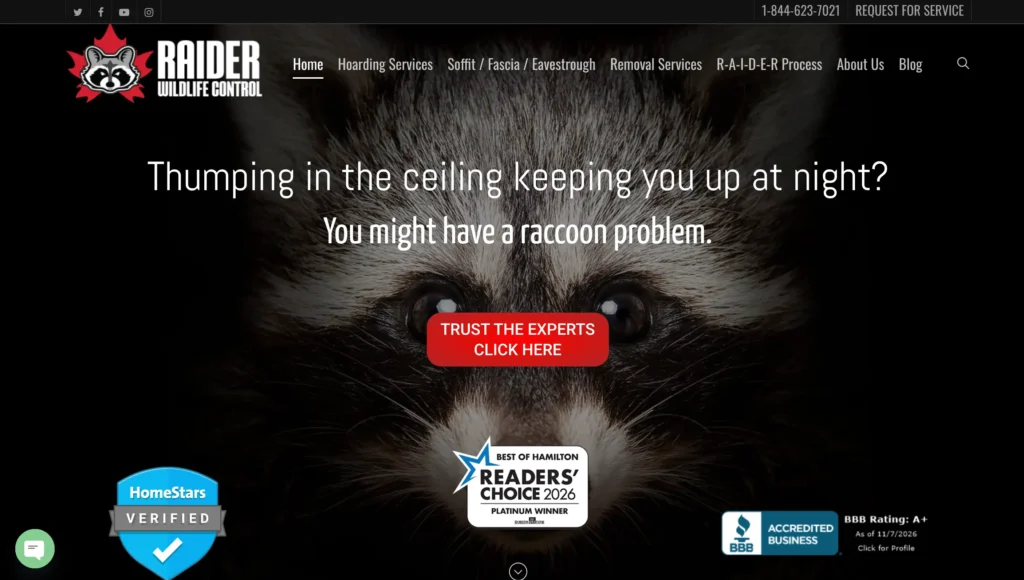
Take note of the strategies:
A click on a phone number isn’t proof that a conversation happened. A long call isn’t proof that the caller wanted a service you sell.
Record a small set of outcomes consistently: new inquiry, qualified prospect, appointment booked, job completed, and recurring plan started. Give spam, existing-customer calls, duplicate inquiries, and out-of-area requests their own labels.
For this purpose, a qualified pest-control lead is someone seeking an offered service at an eligible property who can be contacted and is a realistic buying prospect. Your receptionist should be able to apply that definition without guessing.
Google distinguishes primary and secondary conversion actions. Primary actions can guide bidding when their goal is used by the campaign. Secondary actions generally support observation, although custom goals can make them biddable. Check the campaign’s actual goals rather than relying on the label alone.
Keep page views and button clicks out of the main lead goal. Avoid counting the same form submission through both a Google Ads tag and a GA4 import as two acquisitions.
When the CRM is ready, connect qualified or converted lead outcomes back to Google Ads. Google’s enhanced-conversions-for-leads guidance explains how first-party lead data supports offline matching. Use an appropriate supported connection, meet the customer-data requirements, and check diagnostics rather than assuming every record matches.
Use one well-defined bidding outcome at a time unless you have deliberately designed values across stages. Counting an inquiry, booking, and completed job as three equal successes can make one customer look like three.
Before using conversion-focused bidding, confirm that the conversions represent useful inquiries. Automated bidding cannot repair a goal that rewards spam or a broken thank-you-page tag.
Maximize Conversions can be a reasonable test with valid lead tracking. A restrictive target CPA borrowed from a national benchmark can limit delivery before you learn what your market costs. Set targets from your economics and observed results, allowing for the delay between click and conversion.
If you temporarily use a traffic-focused strategy to collect information, cap the experiment and judge lead outcomes. Cheap clicks alone aren’t the objective.
There is no need to impose a magic conversion-count rule on every account. Signal quality, volume, delay, budget, and the selected strategy all matter. Avoid changing budgets, bidding, ads, and landing pages together; you won’t know which change caused the result.
Match call availability to staffing. After-hours ads can work if someone answers or an effective booking process is available. If all calls go unanswered until morning, review that spend separately before increasing it.
Track spend, unique inquiries, qualified leads, bookings, completed new-customer jobs, and recurring-plan starts by service. Add collected revenue and contribution as they become available.
Calculate advertising cost per completed new customer as spend divided by those customers. For a fully loaded acquisition figure, include management fees, tracking software, and relevant sales costs too.
Compare periods only after allowing time for leads to close. A new campaign can look worse simply because its newest inquiries haven’t become jobs yet.
Don’t pause a relevant keyword after one expensive click. Set a review threshold based on what you can afford and the evidence needed, while fixing obvious waste immediately. An employment query or broken landing page doesn’t need a month of testing.
For more account-wide checks, see our Google Ads strategies for contractors.
Before launch: select priority services and service areas, estimate allowable acquisition costs, confirm phone coverage, finish landing pages, and test tracking. Write down how staff will label lead outcomes.
During the first week: watch search terms, spend, actual service locations, call handling, and form delivery closely. Fix technical problems and clear mismatches quickly.
During weeks two and three: review the first qualified leads with the office. Ask what prospects wanted and why they booked or declined. Test one meaningful improvement, such as a clearer service offer or a shorter form.
At the end of the month: reconcile platform reports with CRM outcomes. Decide whether to continue collecting data, improve the offer, narrow the service mix, or expand. A month is a review point, not a guarantee of enough data.
Increase spend where both customer economics and technician capacity support it. Buying more calls when the schedule is already full can make a promising campaign look unprofitable.
It can, especially when the company serves a defined area, has capacity, and responds reliably. Profitability depends on local competition, click costs, conversion rates, booking performance, and job margins. Start with a focused test rather than assuming a bigger budget will solve those issues.
One that leaves room for delivery costs, overhead, and profit after accounting for how many leads become customers. At a $200 allowable ad acquisition cost and a 40% inquiry-to-customer rate, your planning ceiling is $80 per inquiry. That is an example, not an industry benchmark.
Only if budget and demand justify it. Start with the services you want more of and can deliver profitably. Separate campaigns when you need separate budgets or targets; use ad groups for related searches within a shared budget.
Compare them on qualified leads and completed new-customer jobs. A lower price per inquiry doesn’t prove a channel is better if fewer inquiries become profitable work. Eligibility, lead handling, and the local market affect the result.
Review search terms, negatives, location settings, service-page clarity, and form spam controls. Then feed qualified outcomes back into your reporting. Ask the office why leads were rejected so you fix the source of the problem.
If Google Ads is producing calls without enough profitable work, the problem may sit in targeting, the landing page, tracking, or what happens after the phone rings.
Mastro Digital helps home service businesses with paid ad management and lead generation. We can review your service mix, campaigns, and lead handling to identify what needs attention.
Request a consultation and tell us where you operate, which pest services you want to grow, and what your ads are producing now.
Mastro Digital is a home services marketing and lead generation agency headquartered out of Niagara Falls, Ontario and serving clients across North America.
Copyright © 2026 All Right Reserved Mastro Digital