Google Ads Strategies
For Contractors
How to turn paid search into qualified leads, booked estimates, and profitable jobs.
How to turn paid search into qualified leads, booked estimates, and profitable jobs.
Most contractor Google Ads accounts don’t fail because nobody is searching. They fail because the account is built around clicks instead of the jobs the company actually wants.
A roofing company may be paying for searches about materials and DIY repairs. A remodeler may be sending every service to the same generic page. An HVAC company may be asking Google to optimize for button clicks, even though half of those clicks never become real conversations.
You get our point. The waste adds up quickly.
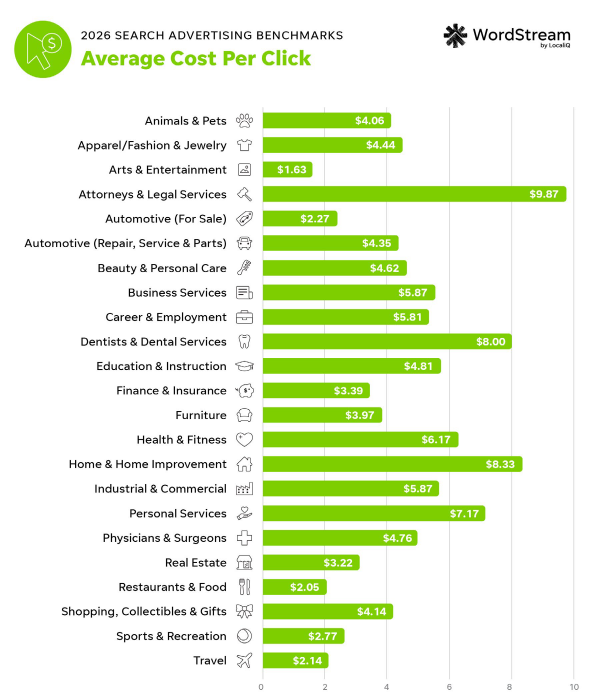
LocaliQ’s home-services search benchmark reported an average cost per click of $7.85, a 7.33% conversion rate, and a $90.92 cost per lead for 2025.
Those are blended figures, not targets for every contractor, but they show why small mistakes get expensive. At roughly eight dollars per visit, you can’t afford loose targeting or weak follow-up.
The Google Ads strategies for contractors in this guide are designed around one outcome: generating jobs at a cost that leaves room for profit.
Those are blended figures, not targets for every contractor, but they show why small mistakes get expensive. At roughly eight dollars per visit, you can’t afford loose targeting or weak follow-up.
The Google Ads strategies for contractors in this guide are designed around one outcome: generating jobs at a cost that leaves room for profit.
A profitable contractor campaign usually has six things working together from our experience working with clients:
Everything else like bidding, match types, automation, and ad assets works better after those fundamentals are in place.
Before opening Google Ads, decide what a customer is worth and what you can afford to pay to acquire one. Good performance marketing comes down to knowing your numbers.
Let’s say a bathroom remodel gets you $18,000 in revenue and a 35% gross margin. That leaves $6,300 in gross profit before overhead. If you are comfortable putting 15% of gross profit toward acquiring the job, your target customer acquisition cost is $945.
Now work backward through the sales funnel:
With those assumptions, you need roughly ten raw leads to produce one customer. A $945 customer acquisition target therefore supports a raw lead cost of about $94.50.
This math gives the campaign a real guardrail. It also shows why “What is a good CPL?” has no universal answer. A $150 roofing lead may be excellent for a replacement job and terrible for gutter cleaning.
Do this calculation separately for each major service. Average job value, gross margin, close rate, and operational capacity can differ substantially.
Allowable customer acquisition cost = gross profit per job × the percentage of gross profit you will invest in acquisition.
Allowable raw lead cost = allowable acquisition cost × lead-to-sale rate
If your numbers aren’t concrete, start with a conservative estimate and replace assumptions with actual CRM data as you get it.
Do not put roofing, siding, windows, and small repairs into one campaign simply because your company offers them.
Separate campaigns when services have different:
A simple structure for a multi-service contractor could look like this:
| Campaign | Example ad groups | Primary outcome |
|---|---|---|
| Roof Replacement | Roofing contractor, roof replacement, new roof estimate | Estimate request |
| Roof Repair | Roof leak repair, emergency roofer, storm damage | Call or urgent booking |
| Siding | Siding contractor, vinyl siding installation, siding replacement | Estimate request |
| Brand | Company name and common variations | Protect branded demand |
Campaign separation lets you assign more budget to the work you want, pause a service when crews are full, and compare performance without blending unlike jobs together.
Inside each campaign, keep ad groups narrow enough that the keyword, ad, and landing page can all discuss the same need. You don’t need one ad group for every keyword variation. You do need clear themes.
Large search volume can be a trap. Contractors make money from people who need work completed, not from everyone researching a topic.
Compare these searches:
The first search suggests the person may be choosing a contractor. The second may come from a future customer, a student, a DIY homeowner, or someone collecting ideas.
Early campaigns should usually prioritize combinations of:
Informational terms can have a place in SEO, remarketing, or a mature paid-search program. They generally should not consume a new contractor’s limited lead-generation budget.
Exact, phrase, and broad match are tools. None is automatically correct in every account.
For a new campaign with limited conversion history, exact and phrase match provide useful control. They make it easier to see which search themes produce genuine inquiries while you build negative-keyword lists and validate tracking.
Broad match can expand reach, and Google says it pairs with Smart Bidding because bids are set using auction-time signals. That does not mean every small contractor should switch everything to broad match on day one. Broad match becomes more defensible when:
Expand deliberately. If the campaign is still optimizing for unverified form fills, broader reach can simply find more people willing to complete an easy form.
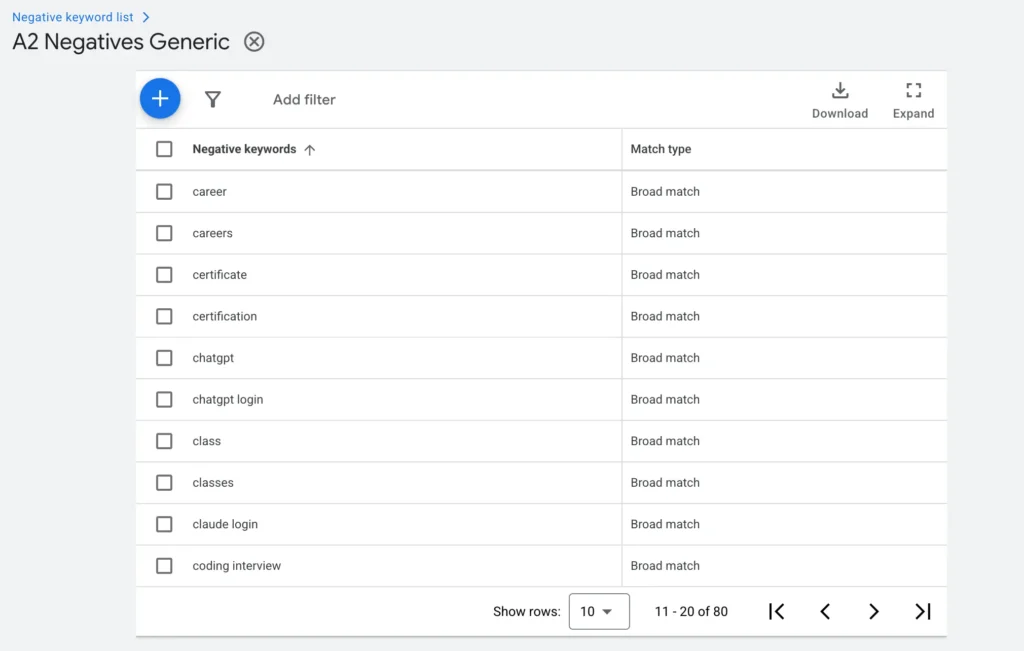
Negative keywords prevent ads from showing for searches you don’t want to buy. Google recommends using the search terms report to find irrelevant queries and add them as negatives.
A starting list for many contractors may include:
You can begin adding negative keywords by navigating to “Keywords” and “Negative keyword list” inside Google Ads.
Don’t paste a generic list into every account without checking it. “Repair” could be a negative for a replacement-only company and a valuable keyword for a service contractor. “Cost” often signals strong commercial intent for large projects, even if some advertisers block it.
Add shared exclusions at the account or campaign level, then use ad-group negatives where you need to stop closely related services from competing with one another.
A contractor serving a 30-mile radius should not pay for interest from people hundreds of miles away.
Google’s location options can include people physically in a location, people regularly there, and people who have shown interest in it. For most local lead gen campaigns, review whether the account should focus on people in or regularly in the service area rather than the broader presence-or-interest option.
Then check the user location report. Searchers may still appear outside the intended area because IP signals and location data are imperfect.
Useful practices include:
Map coverage to real drive time, crew availability, minimum job value, and call-out costs.
Emergency plumbers and HVAC companies may need round-the-clock coverage. Remodelers selling scheduled consultations may not.
Start with the hours when your team can answer or respond quickly. If calls outside business hours go to voicemail and rarely become appointments, there is little value in buying more of them until the handoff improves.
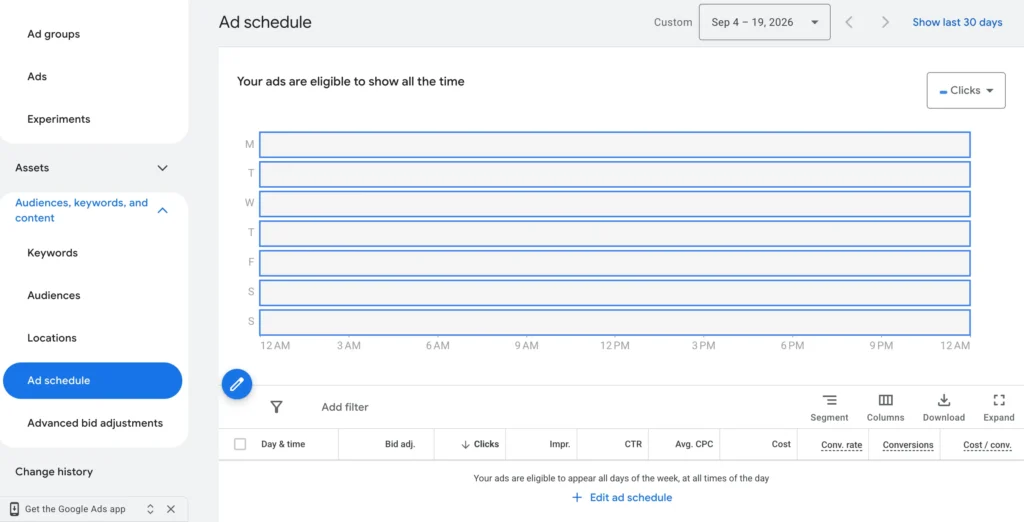
You can change the times your ads serve by selecting a campaign and clicking “Ad schedule.”
Once enough data exists, compare:
Do not reduce bids based only on a high CPL during one time block. Some expensive periods produce better jobs. The decision should come from the whole funnel.
Contractor ads often sound generic: “Quality service. Trusted team. Call today.” That gives a homeowner little reason to choose one result over another.
Use responsive search ads to combine several useful messages:
Google suggests specific calls to action rather than generic wording. “Request a roof inspection” tells the searcher a lot more than “Learn more.”
For example, these are some possible headlines for a window-replacement campaign:
Only advertise claims you can prove. Do not write “same-day service,” “licensed,” “number one,” or “zero-interest financing” unless the business and offer genuinely meet those conditions.
Ad assets give searchers additional information and ways to respond. Depending on eligibility and account setup, contractors should consider:
If you click “Assets”
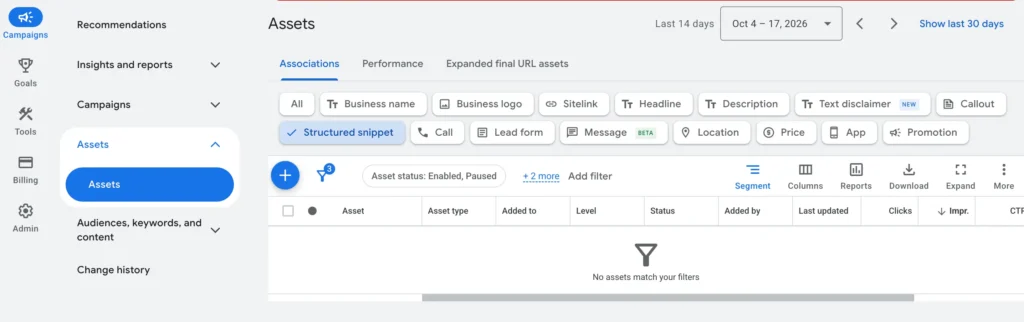
Assets are not decoration. They should answer real questions and support the conversion path. A sitelink to an unrelated blog post can distract from an urgent service campaign, while a financing or warranty page may help a high-ticket prospect move forward.
If someone searches for basement waterproofing, do not send them to a homepage listing twelve unrelated services.
A strong contractor landing page confirms immediately that the visitor is in the right place. It should include:
Here’s an example. If you search “bathroom remodel quote” on Google, Bathfitter has a Google Ad that leads to this landing page:
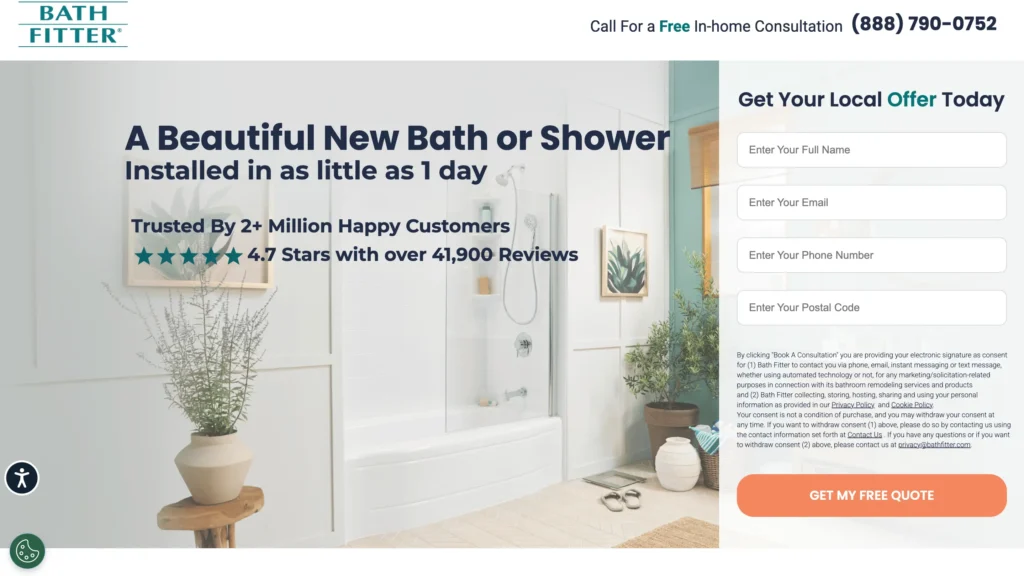
It has a clean hero section, social proof, a value proposition (1-day install), and a lead form. More importantly, it is personalized to the keyword and ad they are running on Google.
Message match matters a lot. Focus on keeping the keyword, ad, and landing-page theme consistent. That consistency also makes the experience easier for the homeowner: the page continues the conversation started by the search.
Speed matters as well. Compress oversized images, limit unnecessary scripts, and test the page on a real phone using cellular data. Contractor traffic is often heavily mobile, especially for urgent services.
Google cannot optimize toward outcomes it cannot see.
At minimum, track:
Google’s website call-conversion tracking can identify calls made after someone visits your site from an ad. For more detail, many contractors use call-tracking software with dynamic number insertion, source attribution, recordings, and lead-quality labels. Follow local consent laws when recording calls.
Avoid counting every phone-button click as a completed lead. A tap is not proof that the call connected. Likewise, do not make page views, time on site, or “get directions” clicks primary bidding signals unless they represent the outcome you truly want more of.
If you need help with running Google Ads and setting up conversion events, contact us for a free consultation. Which, brings us to our next point.
In Google Ads, primary conversion actions are reported in the Conversions column and can be used for bidding. Secondary actions are generally observational and appear in All conversions.
For a contractor lead campaign, sensible primary actions may include:
Possible secondary actions include:
Review each campaign’s goal settings. Accounts often bid toward accidental duplicates because both GA4 and the Google Ads tag import the same form submission, or because shallow actions were left as primary.
This is where many contractor accounts fall behind. And, it’s a 100% essential step in driving the most amount of revenue out of your ads.
If Google receives only a form-submission conversion, it learns which searchers fill out forms. It does not know which leads answered the phone, owned the property, booked an estimate, or purchased a $20,000 project.
Enhanced conversions for leads and offline conversion imports can connect CRM outcomes back to the original ad interaction. Google recommends enhanced conversions for leads as the newer approach for advertisers starting offline imports. It uses hashed first-party information, such as an email address or phone number, to improve matching and measurement.
A useful pipeline might send back:
Do not import every internal status simply because it exists. Choose stages that are consistently defined and meaningful enough to guide budget or bidding.
This setup requires clean CRM habits. If office staff fail to mark outcomes or salespeople use different definitions of “qualified,” the feedback loop becomes unreliable.
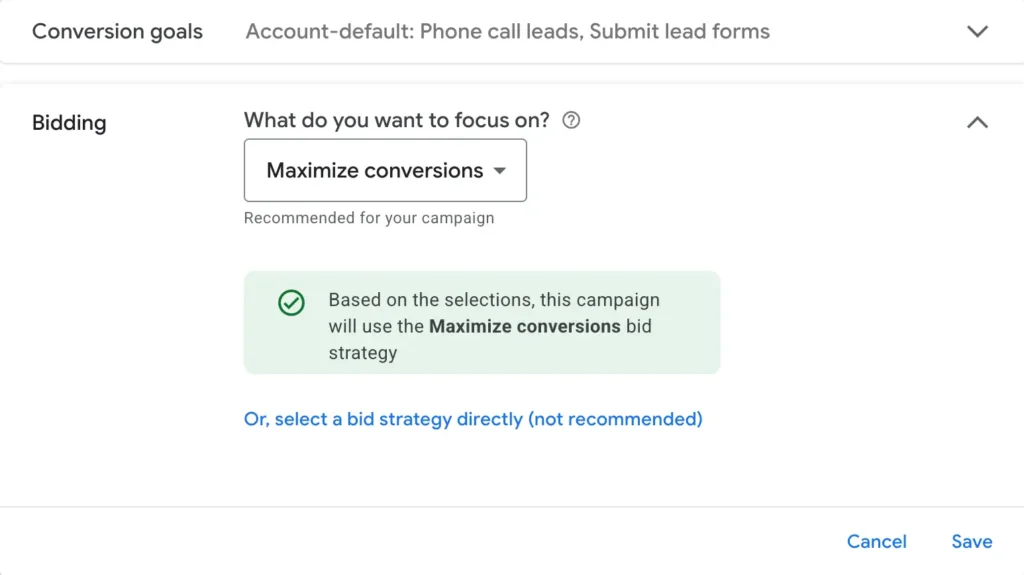
Google’s Smart Bidding options include Maximize conversions, Target CPA, Maximize conversion value, and Target ROAS. These strategies use auction-time signals, but they still depend on the quality of your conversion setup.
A practical progression is:
When you are setting up a campaign, you can select which bidding strategy you would like. We suggest with a fresh account to start with Maximize Clicks to collect data and later switch to Maximize Conversions.
Do not switch strategies every few days. Large changes can disrupt learning and make diagnosis difficult. Give each test a clear reason and enough conversion volume to evaluate.
Do not switch strategies every few days. Large changes can disrupt learning and make diagnosis difficult. Give each test a clear reason and enough conversion volume to evaluate.
A daily budget should be tied to click costs, conversion rate, and the number of leads needed—not chosen because $20 per day feels safe.
Use this basic estimate:
Expected leads = monthly budget ÷ average CPC × conversion rate
If clicks cost $10 and the landing page converts 8% of visits:
Real performance will vary, but the model tells you whether the campaign can gather enough data. Spreading a small budget across ten services and five cities may leave every campaign starved.
Fund the highest-priority service and market first. Expand after the unit economics and sales process are proven.
For a deeper budgeting walkthrough, review our guide on how much contractors should spend on Google Ads.
The search terms report shows many of the actual queries that triggered ads. It should be reviewed regularly, especially after launch, keyword expansion, or bidding changes.
Classify queries into four groups:
Add profitable searches as keywords when tighter control would help. Add irrelevant patterns as negatives. If the same poor theme keeps returning, fix the keyword or campaign structure rather than playing whack-a-mole with individual queries.
Two keywords can generate leads at the same cost and produce very different revenue.
For each important campaign or search theme, report:
Example:
| Campaign | Spend | Leads | Jobs | Revenue |
|---|---|---|---|---|
| Roof Repair | $4,000 | 50 | 8 | $18,000 |
| Roof Replacement | $4,000 | 25 | 5 | $75,000 |
The repair campaign has a lower CPL. The replacement campaign has far more revenue. If you stop at lead cost, you may cut the better investment.
A brand campaign targets searches for your company name. It can help control messaging, occupy more search-page space, and protect traffic when competitors bid on your brand. It can also make performance look better than it really is because branded searchers already know the company.
Report brand separately from non-brand. Otherwise, cheap brand leads can hide weak prospecting performance.
Competitor campaigns can produce expensive, lower-converting traffic. Searchers asked for another company, so your landing page and offer must give them a legitimate reason to reconsider. Avoid using a competitor’s trademark in ad copy without understanding Google’s trademark rules, and never imply affiliation.
For many small contractors, competitor bidding should come after high-intent service campaigns are funded properly.
Performance Max can reach inventory across Search, Maps, YouTube, Display, Gmail, and Discover. That reach can be useful, but it also makes diagnosis harder than a tightly controlled Search campaign.
Consider Performance Max after you have:
If a campaign generates suspicious forms, unreachable leads, or jobs outside the service area, do not celebrate the low CPL. Investigate placement quality, conversion actions, URL expansion, brand overlap, and CRM outcomes.
Search campaigns usually provide the clearest starting point for contractors because they let you meet existing demand and understand the queries producing it.
A homeowner may call an emergency plumber immediately. Someone considering a $60,000 renovation may visit several companies over weeks or months.
Remarketing can keep your company familiar while that person compares options. Useful creative includes:
Exclude existing customers or recent converters when continued advertising would waste budget. Set sensible frequency and use consented first-party data in line with platform policies and applicable privacy laws.
Local Services Ads are separate from standard Google Search campaigns. Eligible businesses can appear prominently in local results and generally pay per lead rather than per click.
For contractors in supported categories and markets, LSAs can complement Search campaigns. They require business verification and may involve licensing, insurance, screening, or profile requirements.
Manage them as their own channel. Track booked jobs and revenue just as you would with Search. Dispute invalid leads when the platform permits it, keep business hours accurate, maintain the profile, and answer quickly. A cheap LSA lead is no more valuable than a cheap Search lead if nobody books it.
Twice per week
Weekly
Monthly
Daily tinkering is not the same as management. Make changes when the data or the business gives you a reason.
Days 1–30: Build and validate
Days 31–60: Improve traffic and conversion quality
Days 61–90: Optimize for the business result
If you want to avoid costly mistakes as a contractor running Google Ads, here are some things to keep in mind:
Benchmarks can help with planning, but they are not a substitute for your economics.
LocaliQ’s 2025 home-services search advertising dataset reported:
Category CPCs varied considerably: general construction and contractors averaged $5.31, while painting averaged $13.74, electrical $12.18, roofing and gutters $10.70, and plumbing $10.49.
Use these numbers as context, not promises. Your market, offer, job type, competition, brand strength, landing page, season, and definition of a conversion all affect results.
The more useful benchmark is your own trend: Are qualified lead costs improving? Are appointment and close rates healthy? Is the campaign producing profitable jobs without overwhelming the team?
They can work very well because Search campaigns reach people actively looking for a service. Profitability depends on targeting, click costs, landing-page conversion, follow-up, close rate, job value, and margin. Ads cannot compensate for poor sales handling or an offer the market does not want.
Search is usually the clearest place to start because it captures existing demand and provides query-level insight. Local Services Ads may also be valuable for eligible trades. Performance Max, Display, Demand Gen, YouTube, and remarketing are better treated as additions based on goals, data, budget, and creative resources.
Broad match can work when conversion tracking is accurate, Smart Bidding has useful signals, negatives are maintained, and the budget can support exploration. New or small accounts often benefit from starting with more controlled exact and phrase coverage, then expanding based on evidence.
The budget should buy enough qualified traffic to test the funnel. Estimate click volume using local keyword costs, then apply a conservative landing-page conversion rate. Concentrating the budget on one priority service is usually more useful than spreading it thinly across every service.
LocaliQ reported a 7.33% average for home-services search advertising in its 2025 benchmark. Your rate may be higher or lower depending on service, urgency, location, offer, device, and what you count as a conversion. A lower conversion rate with excellent lead quality can be more profitable than a high rate filled with weak inquiries.
Search ads can generate visibility and inquiries soon after launch, but reliable optimization takes longer. Allow time to validate tracking, collect search terms, gather meaningful conversions, and connect leads to sales outcomes. Avoid judging an account from a few days or a handful of leads.
A contractor can manage a small account with enough time and training. The harder parts are usually measurement, lead-quality feedback, landing pages, and disciplined optimization—not creating the first ad. Professional help becomes more valuable when budgets, services, locations, or tracking requirements grow.
Google Ads can give contractors a predictable way to reach homeowners at the moment they are searching. It can also burn through a budget quickly when campaigns are built around traffic instead of profit.
Start with the work you want. Know what a sold job is worth. Keep services and locations organized. Buy searches with hiring intent. Match the ad to the page. Track real calls and forms. Then connect those leads to appointments, sales, revenue, and gross profit.
That is how paid search becomes a growth system rather than another expense you hope works.
If you want the broader picture, read our guide to contractor lead generation strategies. If you’d rather have the campaigns, landing pages, tracking, and lead flow managed together, learn more about Mastro Digital’s home-services lead generation services.
Mastro Digital is a home services marketing and lead generation agency headquartered out of Niagara Falls, Ontario and serving clients across North America.
Copyright © 2026 All Right Reserved Mastro Digital