How Much Should Contractors
Spend on Google Ads?
Strategies, formulas, and benchmarks for your google ads budget.
Strategies, formulas, and benchmarks for your google ads budget.
If you’re a contractor using Google Ads, one of the first questions you’re probably asking is: How much do I actually need to spend?
A roofer, plumber, electrician, landscaper, and bathroom remodeler can have completely different costs, job values, competition levels, and close rates.
The right Google Ads budget is the amount required to generate enough profitable jobs to meet your growth goals—without spending beyond what your market or team can handle.
That’s what we’re going to figure out in this guide.
We’ll cover how much Google Ads leads typically cost, what a realistic budget looks like, and strategies you can use to get the most bang for your buck.
Let’s get into it.
If you just want a rough planning range, here’s a useful starting point:
$1,000-$2,000. A lean budget like this is best spent towards a single location or service to maximize results and get enough data to make better decisions.
$2,000-$5,000. With a larger budget, you can now expand into multiple cities and services.
$3,000-$10,000. If you plan to use Google Ads in competitive trades or locations, you will have more competition, and naturally, it becomes expensive.
$10,000-$50,000. For companies that want to grow quickly or have more than one location, you will need a large budget to cover geotargeting and be competitive.
Keep in mind these aren’t hard. They’re starting points.
A contractor in a small town might generate excellent results with $1,500 per month.
A roofing company in Dallas could burn through that in a few days.
The biggest variables are:
So instead of asking, “What’s a normal Google Ads budget?”
A better question is, “How much can I profitably spend to acquire the number of jobs I want?”
That’s the number that matters.
Let’s start with some real numbers.
LocaliQ analyzed more than 3,200 home-services search campaigns running from April 2024 through March 2025.
Across home services, the median results included:
But the average hides a huge difference between trades.
Here’s what the cost-per-lead data looked like:
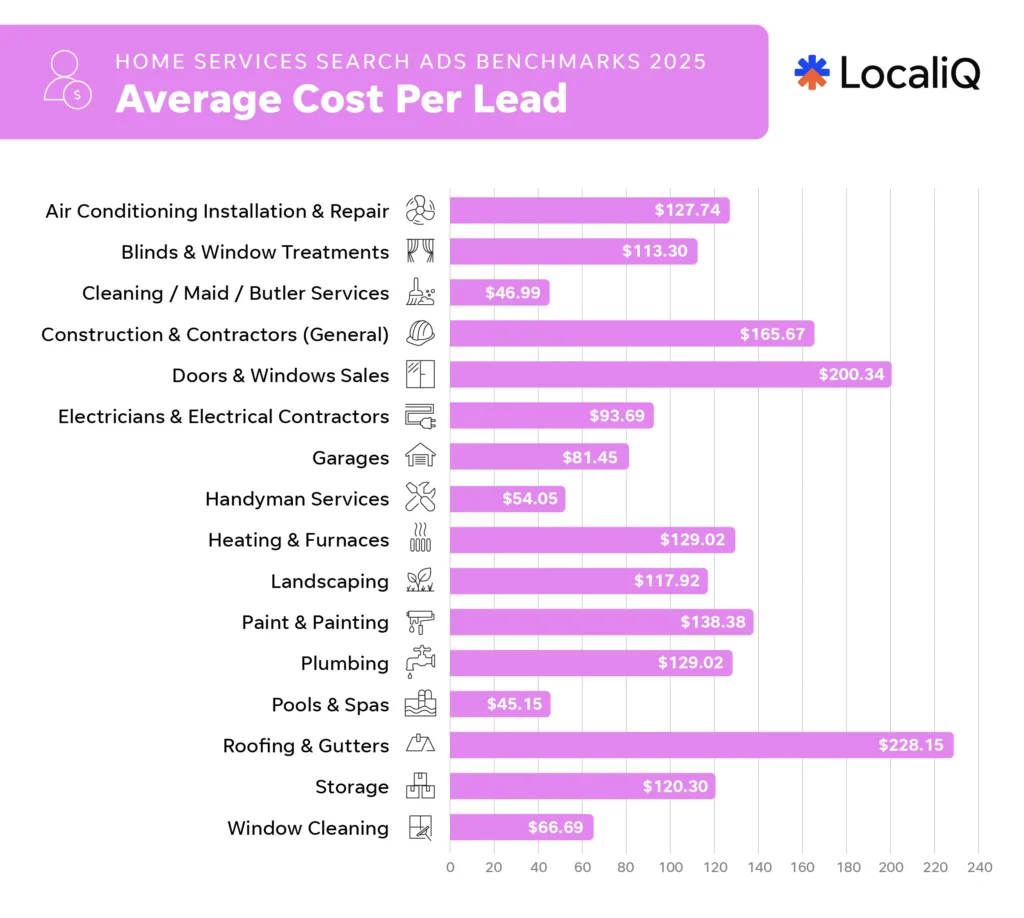
That’s a massive range.
A $2,000 budget at a $50 cost per lead could theoretically generate around 40 leads.
At a $200 cost per lead, the same budget generates around 10.
You have to consider your industry, target audience, and location. It greatly changes your Google Ads budget and cost per lead.
This is probably the most important concept in this article. Most contractors approach Google Ads blindly.
They can afford, let’s say, $1,500. That’s what they set as their budget and hope for the best.
Instead, you should try reversing the process.
How many more additional jobs do you want every month and that you have the resources to maintain?
Imagine you’re a bathroom remodeling contractor.
You want 5 additional jobs per month. You normally close 25% of qualified leads. That means you need roughly 20 qualified leads to generate 5 jobs.
If you expect those leads to cost $150 each:
20 × $150 = $3,000 monthly Google Ads budget.
Now you have a budget tied to an actual business goal. That’s much better than randomly selecting $2,000.
Building off of our last point, you can use this formula to figure out your Google Ads budget as a contractor:
Jobs wanted ÷ close rate = leads required
Then:
Leads required × expected cost per lead = advertising budget
Let’s use a plumber. The company wants 10 additional jobs. They close 40% of paid leads.
10 jobs ÷ 0.40 close rate = 25 leads needed.
Their expected cost per lead is $130, meaning they need a monthly budget around $3,250.
25 × $130 = $3,250
A reasonable starting monthly budget would therefore be around:
$3,250
Now we’re making a business decision instead of guessing.
Let’s dive deeper into this.
Lead volume and costs alone aren’t enough. You need to calculate the revenue you would drive from Google Ads to get the best picture.
Let’s say you spend $1,000 and generate 20 leads. That gives us a $200 CPL.
That sounds expensive, right? Well, what if your average project costs $10,000? Even if you close 1-2 of those leads, you’re generating $10,000-$20,000 in revenue with a huge ROI.
That’s an exercise we suggest or do with a lot of our clients at Mastro Digital.
It’s easy to be intimidated by spending on paid ads or other digital channels.
However, when you see the math and the revenue it can turn into, it becomes a completely different beast.
In paid advertising, one of the most important metrics is your customer acquisition cost, commonly called CAC.
What it really boils down to is: how much advertising money does it cost to produce a paying customer?
If you’re paying $150 per lead and closing 25%, you need roughly four leads for every job.
Your estimated customer acquisition cost is $600 with these numbers in mind.
Now compare that $600 to the gross profit from the job.
If you’re making $5,000 in gross profit from an average project, paying $600 to acquire the customer may be excellent.
If you’re making $300, it’s a problem.
This is why two contractors can run virtually identical Google Ads campaigns and have completely different opinions about whether the platform works.
Their business economics are different. Which brings us to our next point.
Here’s an easy mistake to make.
Let’s imagine your average project is $10,000.
So you think:
“I could easily spend $2,000 getting that customer.”
Not necessarily. What does the job leave after:
Maybe that $10,000 project produces $3,500 of gross profit. That’s the number you should compare against your acquisition cost.
You don’t pay Google with revenue. You pay Google with the margin left after delivering the work.
Google Ads is an auction. You’re competing against other companies bidding for the same searches.
A contractor advertising in major cities like Toronto or New York can face much more competition than someone operating in a smaller regional market.
Even areas 30 miles apart can behave differently. You also have to consider your service radius.
If you target one city or specific zip codes, your budget goes further.
If you target an entire state, you’ve dramatically increased the amount of potential traffic your budget has to cover.
Start with the markets that matter most. You can always expand later.
Not all keywords have equal value.
Consider a plumber. These searches aren’t equivalent:
“how to unclog sink” and “emergency plumber near me.”
The second search has much stronger commercial intent. More contractors want that traffic.
Competition rises. The click becomes more expensive. But it can also be much more valuable.
The same applies to:
A good Google Ads campaign doesn’t simply chase cheap clicks.
It pays for searches that have a realistic chance of becoming revenue.
Suppose you have a $2,000 budget. You create campaigns for:
Now each service barely has any money.
Instead, ask: Which one or two services do we actually want to grow?
Maybe your bathroom remodels:
Start there. Get the campaign working. Then expand.
I’d rather have a well-funded campaign for one profitable service than eight starving campaigns that never collect enough meaningful data.
This is a massively overlooked detail we notice when managing paid ads for contractors and home services companies.
The landing page, which is where we send traffic, is often not given the attention it deserves.
Suppose two contractors both pay $10 per click and buy 200 clicks. That’s $2,000.
Contractor A’s website converts at 5% which equals 10 leads and a $200 cost per lead.
Contractor B’s landing page converts at 10% which is 20 leads and a $100 cost per lead.
Which would you say is better? Contractor B, of course.
They spent exactly the same amount but one generated twice as many leads.
That’s why improving your website can effectively make your advertising budget more powerful.
Google specifically recommends closely matching landing pages with the ads and keywords that send people there. The platform evaluates landing-page experience and ad relevance as important measures of ad quality.
For contractors, your landing page should make a few things immediately clear:
Use:
Don’t pay $15 for a click and then make the homeowner work to figure out what you do.
More budget makes sense when you’ve proven the existing budget produces profitable business.
Look for these signals:
You don’t have to check off all these boxes. But, if you see some of these signs, it’s a hint to continue testing raising your Google Ads budget.
There is no perfect Google Ads budget for every contractor. And that’s actually a good thing.
Because once you understand the numbers, you don’t have to guess.
Start with the jobs you want. Work backward to the leads you need. Estimate what those leads will cost.
Compare your customer acquisition cost against your gross profit. Then launch, measure, and improve.
The goal isn’t to spend as little as possible.
It’s to spend as much as you can profitably and operationally handle while continuing to generate the kinds of jobs you actually want.
That’s the difference between simply “running Google Ads” and using paid search as a predictable growth channel.
Reach out for a free consultation to learn about our paid ads management services.
Mastro Digital is a home services marketing and lead generation agency headquartered out of Niagara Falls, Ontario and serving clients across North America.
Copyright © 2026 All Right Reserved Mastro Digital