Meta Lead Gen Forms
For Contractors
How to generate, qualify, and convert better contractor leads on Facebook and Instagram.
How to generate, qualify, and convert better contractor leads on Facebook and Instagram.
$127 billion. That’s the amount advertisers will spend on Meta by the year 2027.
Why? Because Meta and it’s platforms like Facebook remain as one of the best places to generate leads and revenue for any business.

One of the most popular strategies for contractors is use the use of lead generation forms.
These native forms can get you a steady stream of homeowner inquiries without forcing people to leave Facebook or Instagram. The form opens inside the app, contact fields can be prefilled, and the person can request an estimate in a few taps.
That convenience is also the source of the biggest complaint contractors have about Meta leads: the leads can be cheap, but not always serious.
The answer is not to abandon instant forms. It is to design the entire system around lead quality. From the offer and ad creative to the questions, follow-up process, and feedback you send back to Meta.
Keep reading if you want to learn how to use Meta lead gen forms to attract better prospects, filter out poor fits, and get booked estimates as a contractor.
Meta calls them Instant Forms. They are used with the Leads objective in Meta Ads Manager and can run across Facebook and Instagram. When someone taps the call-to-action, a mobile-friendly form opens without sending them to a separate landing page.
Meta can prefill details such as a person’s name, email address, and phone number using information associated with their account. You can also ask custom questions, use conditional logic, add a privacy-policy link, and send the person to a website or booking page after submission.
Here is an example of what a lead generation form looks like from the customer’s perspective:
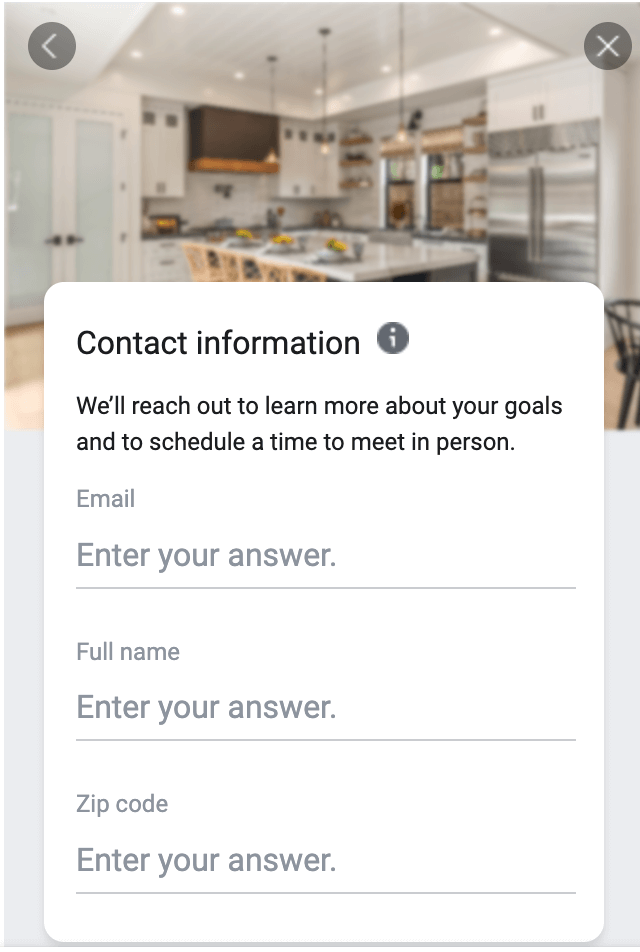
According to Meta’s Instant Form documentation, forms can be configured to maximize volume, add a review step for higher intent, or use conditional logic that changes the experience based on a person’s answers.
Home services often begin with a simple need: a homeowner wants a quote, inspection, consultation, or appointment. Instant forms reduce the effort required to raise a hand. Simple as that.
They are very useful for services that benefit from visual advertising, like:
Unlike Google Search, Meta does not depend on someone searching for your service at that exact moment. It can create demand by showing the right homeowner an attractive result, offer, or problem they recognize.
This makes Meta especially valuable when search volume is limited, competition on Google is expensive, or you want to generate demand before the homeowner has chosen a contractor.
A low cost per lead can look great inside Ads Manager while producing disappointing business results.
Because Meta makes forms easy to complete, some people submit accidentally, forget they filled out the form, live outside the service area, want a service you do not provide, or have no realistic budget or timeline.
That is why cost per lead should never be the final score. The funnel you should measure is:
Ad spend → submitted leads → contacted leads → qualified leads → booked estimates → sold jobs → revenue
A campaign generating $35 leads can be worse than one generating $80 leads if the second campaign produces more appointments and profitable jobs.
For most contractors, the best starting point is a Higher Intent form rather than the lowest-friction option.
A higher-intent form adds a review screen before submission. That small extra step gives homeowners a chance to confirm their details and reduces accidental submissions.
Meta’s lead-ad setup guidance specifically describes the review step as a way to let people confirm their information.
More Volume forms may still make sense when:
Do not choose a form type based solely on which produces the cheapest leads. Test it against qualified lead rate, booked appointment rate, cost per appointment, and cost per sale.
The form is only as good as the reason someone has to complete it. “Contact us” is rarely a compelling offer.
Contractor offers usually perform better when they clearly explain what the homeowner receives. Examples include:
Avoid misleading discounts, false urgency, or savings claims you cannot substantiate. If there are eligibility requirements, service-area limits, minimum project sizes, or financing conditions, say so before the person submits.
Clear expectations may reduce form volume slightly, but they often improve the percentage of leads your team can actually sell.
Qualification should begin in the ad, not after the lead enters your CRM.
Your creative and copy should make the service, location, ideal project, and next step obvious. A homeowner should understand what they are requesting before opening the form.
Strong contractor creative can include:
For example, a bathroom remodeler could state that the company handles full renovations in a defined service area. That wording discourages people looking only for a small repair, DIY advice, or work outside the territory.
Use multiple creative angles rather than making small variations of one ad. Test proof, education, pain points, outcomes, offers, and project examples.
Every question should either help qualify the lead, route it correctly, or prepare your salesperson for the conversation. Do not add friction without a reason.
A practical contractor form could ask:
Meta provides guidance for using custom questions to align forms with business objectives. Its Instant Form question resource is a useful reference when planning them.
Prefer multiple-choice questions when possible. They are fast to answer, easier to standardize in your CRM, and simpler to use for routing and reporting.
Which project are you planning?
When would you ideally like work to begin?
Do you own the property?
What is the project’s postal or ZIP code?
This gives the sales team enough information to prioritize and personalize follow-up without turning the form into a long application.
Conditional logic allows the form to change based on previous answers. Meta says it can be used to qualify or disqualify potential leads before submission in its conditional-logic documentation.
For example:
Use disqualification carefully. A prospect who is not ready today may still become valuable later. When possible, separate “not a fit” from “not ready yet” and follow up accordingly.
Here’s a great video we found from Analytical Growth on this exact topic and setup:
Most contractors should collect, at minimum:
Phone number is usually the most important field for estimate-driven services. Email is useful for confirmations, nurture, and sending proof or project information.
Because prefilled details can be outdated, the higher-intent review step is valuable. If SMS verification is available in your account and market, it can add another quality check. The trade-off is additional friction, so evaluate it using downstream outcomes rather than form completion rate alone.
The thank you screen should tell the homeowner exactly what happens next. Do not end with a generic “Thanks.”
A stronger version could say:
Thanks—your estimate request has been received. A member of our team will call within 10 minutes during business hours. Please keep an eye out for a call or text from [phone number].
You can also include a button to:
This reinforces the submission, increases recognition when your team calls, and gives motivated prospects another way to move forward immediately.
Downloading a CSV once per day is not a serious follow-up system. Connect the form to your CRM or lead-management platform so every inquiry appears immediately.
Your workflow should:
Common options include direct CRM integrations, automation platforms such as Zapier or Make, and custom webhook/API connections.
Meta leads are often what we call interrupted-demand. The homeowner may have been watching a video or scrolling through photos when your ad caught their attention. They are not always waiting by the phone.
Contacting them quickly helps connect the call to the action they just took.
A practical sequence might look like this:
Identify your company, mention the specific request, and make the next step easy. “You requested a bathroom-remodel estimate on Facebook” is more recognizable than “I am following up on your inquiry.”
Respect consent, calling hours, opt-outs, and applicable email/SMS laws in every market you serve.
If Meta only receives the “lead submitted” event, it learns to find people likely to submit forms. That is not necessarily the same as finding homeowners likely to book and buy.
Connect your CRM outcomes to Meta using Conversions API for CRM when your setup supports it. Meta explains that CRM integrations can send lead data back to help improve ad performance and optimize for higher-quality leads.
Meta reports that campaigns using Conversions API for CRM with the qualified-leads performance goal saw a 21% lower cost per qualified lead on average than campaigns optimizing for leads. Treat that figure as Meta’s reported result, not a guarantee for every contractor. See Meta’s performance-goal documentation.
The critical part is defining stages consistently. For example:
Feed accurate outcomes back. If salespeople do not update the CRM, the advertising algorithm and your reports will both learn from incomplete information.
Use a funnel scorecard rather than reporting only cost per lead.
Break these metrics down by campaign, ad set, creative, service, location, and form. A form with a higher CPL may be your best performer after qualification and sales are considered.
Contractors often change the audience, creative, offer, form, and follow-up process simultaneously. When results move, nobody knows why.
Prioritize tests with a clear hypothesis:
Give tests enough budget and time to produce downstream outcomes. Declaring a winner after a handful of leads often optimizes for noise.
Form headline: Request Your Free [Service] Estimate
Intro: Tell us a little about your project. Our local team will review the details and contact you to discuss options and schedule the next step.
Questions:
Contact details: Name, phone number, and email address.
Privacy: Link to your current privacy policy and clearly explain how the information will be used.
Completion message: Thanks—your request has been received. We will call shortly from [phone number]. You can also use the button below to book a convenient time.
Adapt this template to the service. A roofer, remodeler, HVAC company, and pest-control provider should not use identical questions.
Neither is always better. Instant forms reduce friction and can generate volume efficiently. Landing pages give you more room for education, proof, tracking, and complex qualification. Test both using qualified leads, appointments, and sales—not only CPL.
Use the fewest questions needed to determine fit and route the lead. For many contractors, three to six custom questions is a reasonable starting range, but the right number depends on project value, sales capacity, and qualification requirements.
Budget questions can improve qualification for higher-ticket projects, but they may reduce completion rates or produce unreliable answers. Use broad ranges, explain why you are asking, and compare downstream quality before deciding.
As quickly as your team can respond consistently during stated business hours—ideally within minutes. Immediate confirmation and a clear caller identity help prospects recognize the follow-up.
Yes. Meta supports CRM connections and Conversions API for CRM, and many contractors use direct integrations or automation tools. The connection should pass both lead details into the CRM and meaningful lead outcomes back to Meta when possible.
Meta lead gen forms can become a dependable acquisition channel for contractors, but only when they are treated as part of a complete sales system.
The winning setup does more than generate inexpensive submissions. It uses a specific offer, honest creative, meaningful qualification questions, conditional logic, immediate CRM delivery, fast follow-up, and closed-loop reporting.
Start by improving the biggest weakness in your current funnel. If lead volume is low, test the offer and creative. If quality is poor, improve expectations, form type, and qualification. If leads are not booking, inspect response time and follow-up. If Meta keeps finding the wrong people, send accurate CRM outcomes back through Conversions API.
The goal is not the lowest possible cost per form. It is a predictable cost to acquire profitable contracting jobs.
Need help building the entire system? Learn more about Mastro Digital’s home-services lead generation services.
Mastro Digital is a home services marketing and lead generation agency headquartered out of Niagara Falls, Ontario and serving clients across North America.
Copyright © 2026 All Right Reserved Mastro Digital